Migrate from Koha · 025.9 KOH
Koha taught a generation of libraries what an open system can be. When you are ready for a quieter desk, Lumina reads your Koha data, shows you a dry run, keeps your ids and lets you roll it all back.
The honest version
The import itself is quick. The care is in the rehearsal: a dry run, a rehearsal into a scratch database, and a reading of the reconciliation report. If you do those, cutover day is small.
Step by step
Back up and freeze
Take a koha-dump (or mysqldump) of Koha and a backup of the target Lumina database. Pick a quiet moment for the final dump so loans, holds and fines do not change under you.
Preview
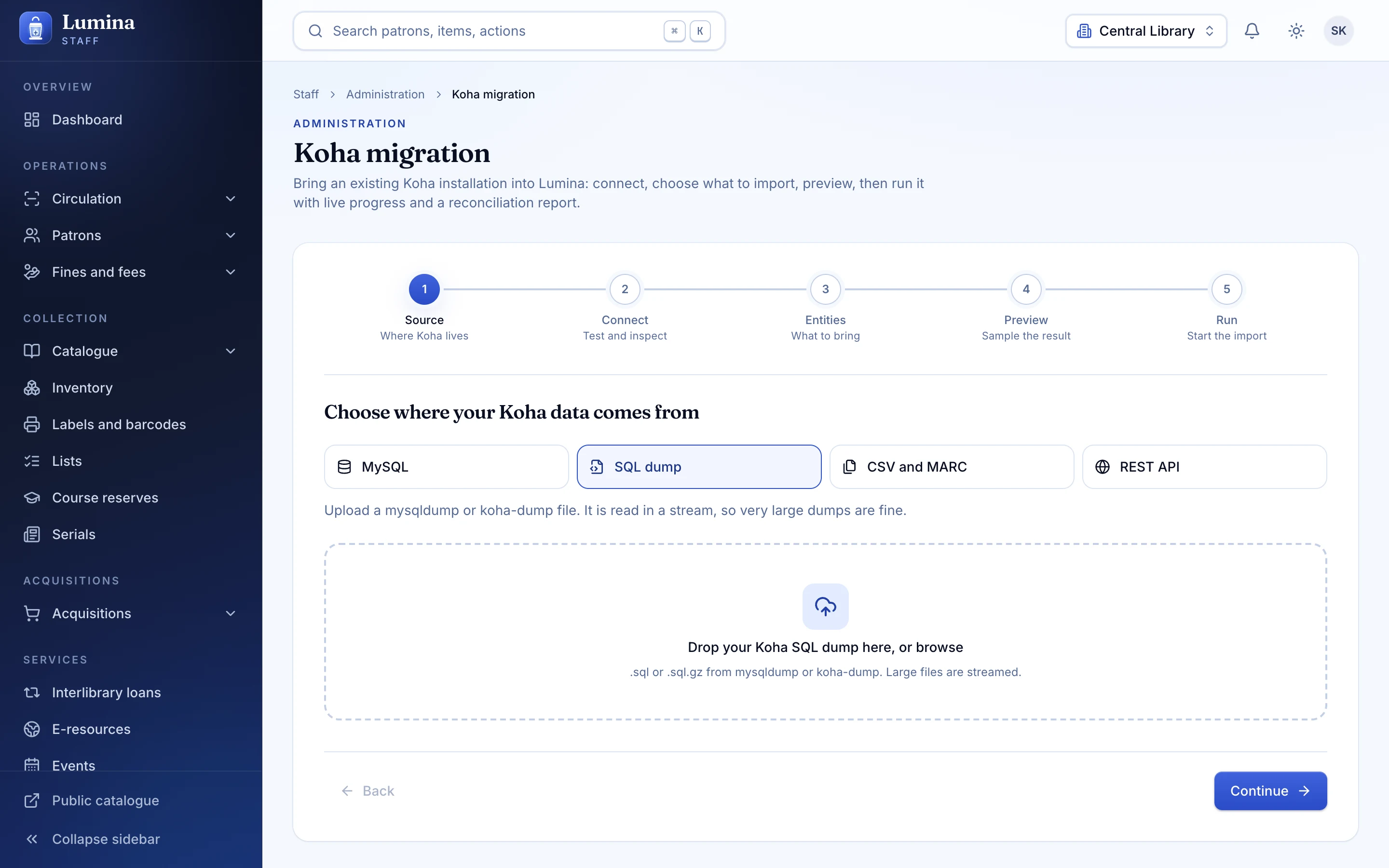
Point the wizard at the dump. A preview reads 200 rows per table and writes nothing, so you see the shape of your data.
Dry run
A full dry run counts every entity and writes nothing. Read the counts and the warnings.
Rehearse into a scratch database
Run the real import into a copy of Lumina. Preserve Koha ids if other systems refer to them. Look at the catalogue, a few members, some loans.
Read the reconciliation report
Counts in against counts out, and every row that needed attention. Fix what you need in Koha, take a fresh dump, and repeat. Re-runs are idempotent.
Cut over
Take the final dump, import, check, and switch the desks over. Members sign in with their existing passwords. Keep Koha read-only for a while as a safety net.
Four sources
Koha
Lumina
Live MySQL. All 42 entities and password hashes. Tested against fakes, not a live Koha server.
SQL dump. koha-dump .sql or .sql.gz. All 42 entities and password hashes. Tested end to end on a synthetic dataset. The recommended cutover path.
CSV and MARC. Folder of CSV plus MARC files. Tested end to end (CSV); MARC reader is unit-tested.
Koha REST API. Partial: 22 of 42 entities and no password hashes. Tested against fakes.
Risk, answered
- Koha is never written to. Lumina only reads.
- Undo is exact. Every written row is tied to its batch.
- Re-runs do not duplicate. Matching is by key.
- Ids can be preserved. Keep your Koha ids.
- Members keep logins. Password hashes are carried over (not via REST).
- Not yet proven on a live Koha server. Rehearse on a copy.
Pre-flight checklist
- Backup of Koha (koha-dump or mysqldump)
- Backup of the target Lumina database
- A read-only database user, if using direct MySQL
- A list of what you rely on that is Planned in Lumina (SIP2, Z39.50, plugins)
- Your Koha server time zone
- A staff account with the import permission
- A rehearsal date and a cutover date
- A plan for the first week: Koha read-only, one person to triage
Questions
What if something goes wrong?
Roll the batch back. Every row Lumina wrote is recorded against the import batch, so undoing it is exact. Lumina only ever reads Koha, so your Koha stays untouched.
Will anything be lost?
The importer covers 42 entity types and 279 field mappings, but Koha is large. Some things are deliberately not carried: for example Koha's Perl plugins, and per-rule daysmode values beyond Calendar and Days. The reconciliation report and the migration guide list what maps and what does not, so read them before cutover.
Do members keep their passwords?
Yes for the MySQL, dump and file sources: hashes are carried over and upgraded on first sign-in. Not for the REST source. Treat the migrated database as sensitive until everyone has signed in once.
Can we run both systems side by side?
Yes, and we recommend it: import a copy, run Lumina in parallel with staff for a few days, then cut over with a fresh dump.
How long does it really take?
The mechanical import is quick, and a day is realistic for a small or mid-sized library once you have rehearsed. Budget separate time for the rehearsal, checking the report, and training staff.
Next step
Start with a rehearsal.
Send us the version of Koha you run and how many records and members you have. We will plan the dry run with you.